Inventory Finder is where a user can search and find and filter their inventory and see where it is available at a particular time.
You can filter to find the inventory you are interested in by:
- Trading periods
- Location Features - these are bespoke to individual retailers
- Asset Categories - these are bespoke to individual retailers
- Products - these are bespoke to individual retailers
- Tags and chosen custom fields - set on assets
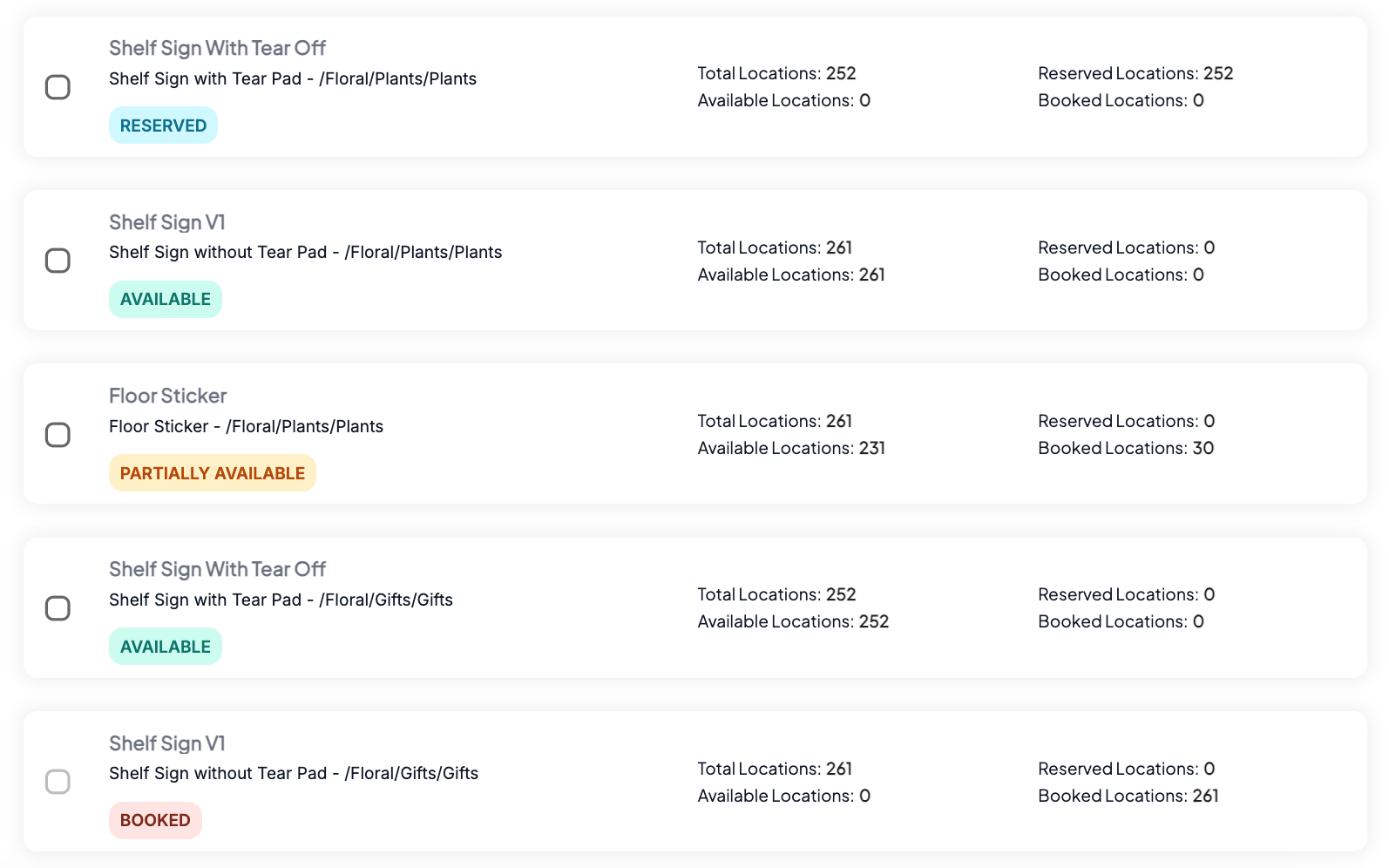
Inventory can have varying statuses on them to indicate their availability:
- Available - an asset is available to book across all its locations for the search criteria applied
- Reserved - an asset is available to book across all locations for the search criteria applied however there are reservations across some or all those locations
- Partially Available - An asset is only available to book in some of the locations for the search criteria applied
- Booked - An asset is unavailable to book across all its locations for the search criteria applied
An inventories status is indicated by their status chip:
Was this article helpful?
That’s Great!
Thank you for your feedback
Sorry! We couldn't be helpful
Thank you for your feedback
Feedback sent
We appreciate your effort and will try to fix the article