Once Features are created in Admin, they can be assigned and managed at an individual Location level using the Location Profiler.
Admin: Full Access
Super User: Edit Only
Basic User: View Only
Group Manager: View Only
Edit Features for a Location
Navigate to Location Profiler.
Search for and select a Location (for example, Supermarket COL001).
Open the Features tab.
Edit an existing Feature:
Locate the Feature.
Use the Options dropdown to change its value.
Add a new Feature:
Click + Add Features (top right).
Search for the Feature name (for example, Region).
Select an option (for example, North East).
Click Add Features.
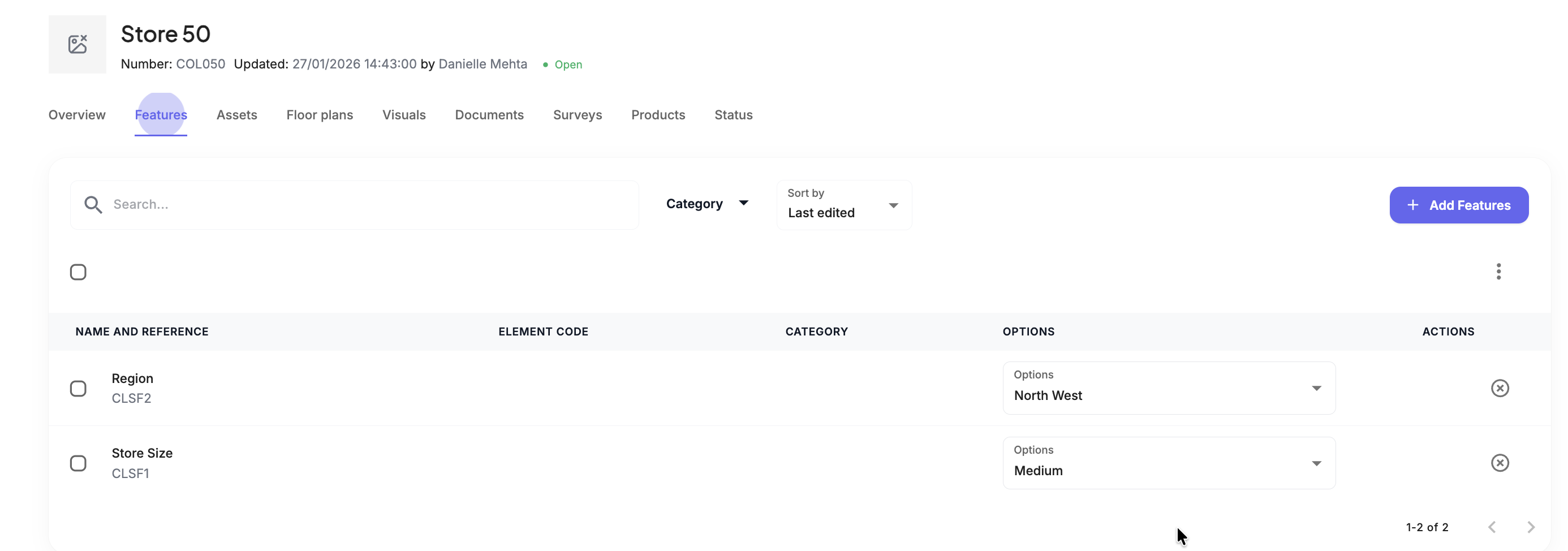
Outcome
The Feature is now assigned or updated and appears in the Location’s active Features list.
Was this article helpful?
That’s Great!
Thank you for your feedback
Sorry! We couldn't be helpful
Thank you for your feedback
Feedback sent
We appreciate your effort and will try to fix the article